Deploy with one prompt.
Type “Run FLUX.1 dev under $1/h” in the built‑in terminal. Your agent finds the weights, compares GPU offers and deploys the one you pick.
Rent GPUs by the hour.
Vast.ai, RunPod or any machine you can SSH into. Balances, machines and $/h in one panel, and a history to bring a model back. Nothing starts without your click.
Your machine. Your files.
The model runs on a GPU you chose, in a region you chose. Prompts, settings and outputs come back to your disk as plain files. No account, no telemetry.
Every model, one window.
Chat with LLMs. Generate images and video with previews. Dernity reads what each model accepts and shows only those controls.
Your AI lab
on rented GPUs.
Tell Claude Code, Codex or any agent CLI which model to run. It rents the GPU, deploys the model and connects it to one desktop app for chat, images and video.
Four steps to a running model.
- 10 seconds
Ask: start your agent in the built‑in terminal and name the model.
- 1 minute
Pick: it lists machines with prices. Nothing starts until you choose.
- 5 to 15 minutes
Deploy: it starts the server behind an SSH tunnel and connects it.
- As long as you need
Use: the model appears in the sidebar. Every output lands in your library.
~/Dernity/workspace
$ claude
> Deploy Qwen3 32B for chat. Keep it under $1.20/h.

● Reading skills/deploy.md
● Searching Vast.ai and RunPod for 48 GB+ offers

  #  provider   gpu           vram    $/h   region
  1  Vast.ai    RTX A6000     48 GB   0.47  Norway
  2  Vast.ai    2× RTX 4090   48 GB   0.72  Poland
  3  RunPod     L40S          48 GB   0.86  EU

  Which offer should I deploy to?

> 1

● Creating instance, starting vLLM, loading weights…
● Wrote models/qwen3-32b.json
  Ready in the Chat tab.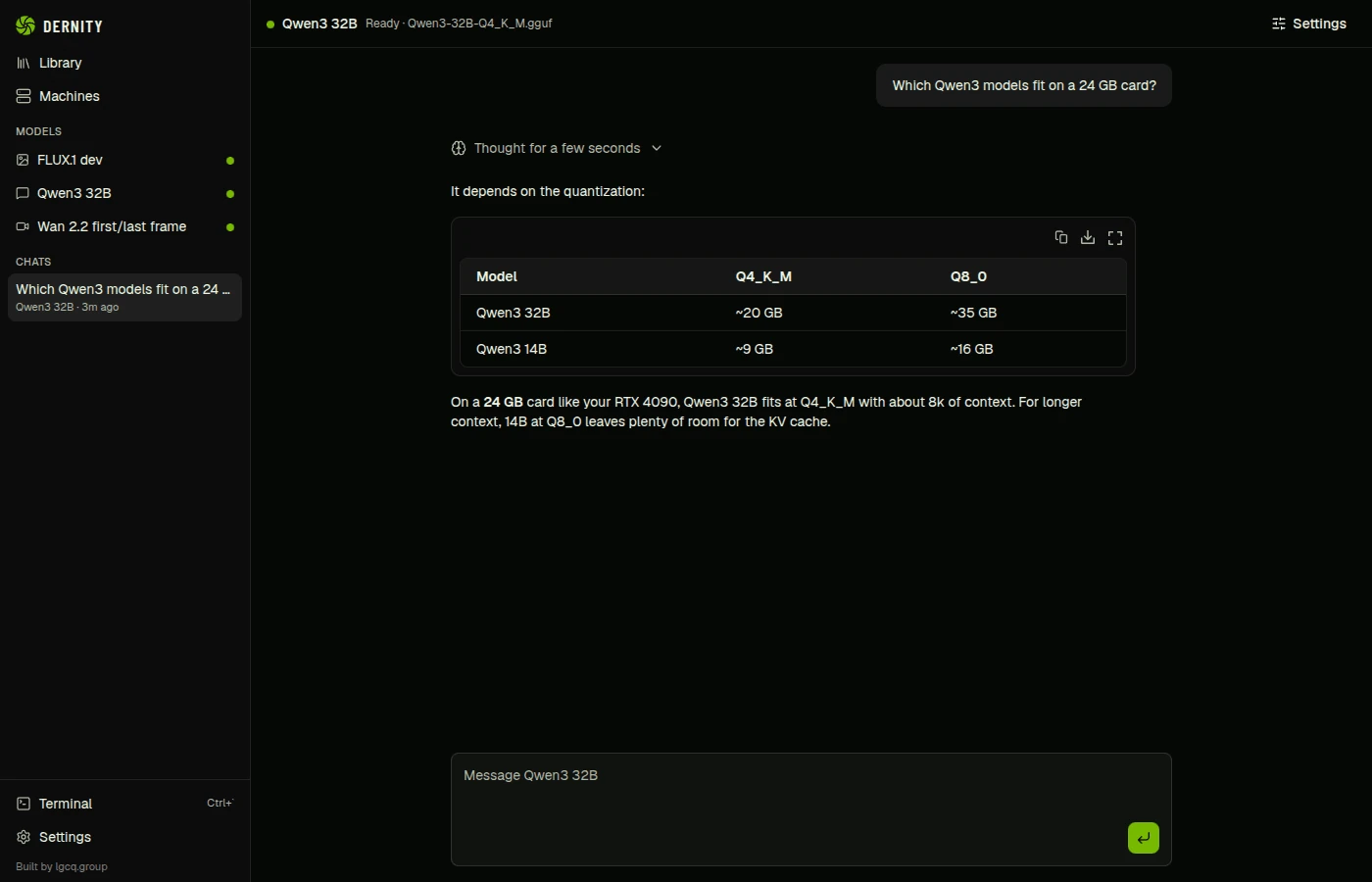
One file per model
The agent writes a small JSON file to ~/Dernity/workspace/models: where the model runs, which API it speaks and what it accepts. Dernity watches the folder and builds the chat or the generation form from it. You can edit the files by hand.
Works with OpenAI‑compatible servers (vLLM, llama.cpp, SGLang, Ollama, TGI, LM Studio) and ComfyUI.
How it works, in the READMEWhat fits on the GPU you rent
48 GBworkstation card, Ampere
- 32B chat models at 8‑bit
- 70B chat models at 4‑bit
- FLUX.1 dev at full precision
- Wan 2.2 14B for video at 8‑bit
48 GBworkstation card, Ampere
- 32B chat models at 8‑bit
- 70B chat models at 4‑bit
- FLUX.1 dev at full precision
- Wan 2.2 14B for video at 8‑bit
Rough figures for inference with common quantisation. Context length and batch size move them.
Between you and the GPU.
Built‑in terminal
Runs the agent CLIs you already use, signed in as you.
Controls that fit the model
Each input appears only when the model supports it.
Every machine in one panel
Balances, running and stopped instances, and $/h across providers.
Survives a reload
Long generations keep running in the background.
A library you own
Prompt, seed, settings and outputs as plain files.
Standard protocols
OpenAI‑compatible APIs for chat, ComfyUI for images and video.
Private by default.
Local only
Everything lives in ~/Dernity as plain files: every generation with its prompt and settings, your chats, your agent’s workspace. No account, no cloud, no telemetry. Back it all up by copying one folder.
Private from the agent
Your library and chats sit outside the agent’s workspace, and Claude Code is configured to deny reading them. The agent deploys models; it can’t read your work. Provider keys are encrypted with your system keychain.
Install it, then ask for a model.
Free for Linux, macOS and Windows. You need an agent CLI and a Vast.ai or RunPod account, or any machine you can SSH into.
Builds aren’t signed yet, so the first launch takes one extra click; the setup guide shows where. Every build is on the release page.
Or build it:
The button copies all three commands. Needs Node.js 22 or newer; npm run dist builds an installer for your system.
$ git clone https://github.com/lgcq-group-org/dernity.git
$ cd dernity && npm install
$ npm run dev